Thursday, 9 May 2013

RMAN-04006: error from auxiliary database: ORA-01031: insufficient privileges

RMAN-04006: error from auxiliary database: ORA-01031: insufficient privileges

I encountered this error while connecting to an auxiliary database.


[oracle@test1 admin]$ rman target sys/oracle@testdb_source auxiliary sys/oracle@testdb_destination

Recovery Manager: Release 11.2.0.1.0 - Production on Thu May 9 21:28:21 2013

Copyright (c) 1982, 2009, Oracle and/or its affiliates.  All rights reserved.

connected to target database: TESTDB (DBID=2596658962)
RMAN-00571: ===========================================================
RMAN-00569: =============== ERROR MESSAGE STACK FOLLOWS ===============
RMAN-00571: ===========================================================
RMAN-00554: initialization of internal recovery manager package failed
RMAN-04006: error from auxiliary database: ORA-01031: insufficient privileges


Here I made one mistake in setting the oracle_sid/db_name. I had added the oracle_sid name in listner.ora file as upper case while in tnsnames.ora and initsid.ora as lower case which was the cause here. 

I changed the sid name entry of all the mentioned files in the same case  and then tried to connect the auxiliary database, it was successfull at that time.


[oracle@test1 admin]$ rman target sys/oracle@testdb_source auxiliary sys/oracle@testdb_destination

Recovery Manager: Release 11.2.0.1.0 - Production on Thu May 9 21:29:47 2013

Copyright (c) 1982, 2009, Oracle and/or its affiliates.  All rights reserved.

connected to target database: TESTDB (DBID=2596658962)
connected to auxiliary database (not started)

RMAN> 

RMAN> 


Tuesday, 7 May 2013

Duplicate a database using rman backups in oracle 11gr2


Duplicate a database using Rman backups in oracle 11gR2.

Duplicating a database or database cloning creates a seperate database that contains all or subset of the source database. Here we don't have to establish the network connection between the source and target host servers, we just need to copy all the rman backups to the target server.

The source database name is "testdb" and I am duplicating with the same name as the source database in the target server. The source hostname is test and the that of target is test1.

SOURCE SERVER


Copy the rman backups to the target server

Copy the spfile and control file auto backup  


[oracle@test ~]$ cd /u01/app/oracle/flash_recovery_area/TESTDB/autobackup/2013_05_06
[oracle@test 2013_05_06]$ ls -lrt
total 28848
-rw-r----- 1 oracle oinstall 9830400 May  6 08:44 o1_mf_s_814697065_8rg80p21_.bkp
-rw-r----- 1 oracle oinstall 9830400 May  6 08:57 o1_mf_s_814697863_8rg8sk2o_.bkp
-rw-r----- 1 oracle oinstall 9830400 May  6 21:22 o1_mf_s_814742526_8rhnfbd2_.bkp
[oracle@test 2013_05_06]$ scp o1_mf_s_814742526_8rhnfbd2_.bkp oracle@192.168.1.193:/u01/app/oradata/backup/
oracle@192.168.1.193's password: 
o1_mf_s_814742526_8rhnfbd2_.bkp               100% 9600KB   9.4MB/s   00:01  

Copy the backup sets of all the datafiles and archive logs


[oracle@test 2013_05_06]$ cd /u01/app/oradata/backup/
[oracle@test backup]$ ls -lrt
total 1089744
-rw-r----- 1 oracle oinstall   36849152 May  6 21:15 df_0do8vuj3_1_1.dbf
-rw-r----- 1 oracle oinstall 1077731328 May  6 21:21 df_0eo8vujn_1_1.dbf
-rw-r----- 1 oracle oinstall     212992 May  6 21:22 df_0fo8vuvs_1_1.dbf
[oracle@test backup]$ scp * oracle@192.168.1.193:/u01/app/oradata/backup/
oracle@192.168.1.193's password: 
df_0do8vuj3_1_1.dbf                           100%   35MB   3.9MB/s   00:09    
df_0eo8vujn_1_1.dbf                           100% 1028MB   2.6MB/s   06:37    
df_0fo8vuvs_1_1.dbf                           100%  208KB 208.0KB/s   00:00    
[oracle@test backup]$ 


TARGET SERVER

Check to see all the backups are copied to the target server location


[oracle@test1 ~]$ cd /u01/app/oradata/backup/
[oracle@test1 backup]$ ls -lrt
total 1099360
-rw-r----- 1 oracle oinstall    9830400 May  6 21:28 o1_mf_s_814742526_8rhnfbd2_.bkp
-rw-r----- 1 oracle oinstall   36849152 May  6 21:28 df_0do8vuj3_1_1.dbf
-rw-r----- 1 oracle oinstall     212992 May  6 21:35 df_0fo8vuvs_1_1.dbf
-rw-r----- 1 oracle oinstall 1077731328 May  6 21:35 df_0eo8vujn_1_1.dbf
[oracle@test1 backup]$ pwd
/u01/app/oradata/backup
[oracle@test1 backup]$ 

Create the necessary directories


Here I have created all the directories same as that of source server.

[oracle@test1 ~]$ mkdir -p /u01/app/oracle/oradata/testdb
[oracle@test1 ~]$ mkdir -p /u01/app/oracle/fast_recovery_area/testdb
[oracle@test1 ~]$ mkdir -p /u01/app/oracle/admin/testdb/adump

Create a pfile with the name inittestdb.ora


Create a pfile with only one parameter DB_NAME, rest of the parameters will be available from the spfile backup during duplication.

[oracle@test1 ~]$ cd $ORACLE_HOME/dbs
[oracle@test1 ~]$ cat inittestdb.ora

DB_NAME=testdb

[oracle@test1 ~]$

Start the duplicate database in nomount


[oracle@test1 ~]$ export ORACLE_SID=testdb
[oracle@test1 ~]$ sqlplus

SQL*Plus: Release 11.2.0.1.0 Production on Tue May 7 22:15:20 2013

Copyright (c) 1982, 2009, Oracle.  All rights reserved.

Enter user-name: /as sysdba
Connected to an idle instance.

SQL> startup nomount
ORACLE instance started.

Total System Global Area 1000189952 bytes
Fixed Size                  1340832 bytes
Variable Size             570428000 bytes
Database Buffers          423624704 bytes
Redo Buffers                4796416 bytes
SQL> 


Connect to duplicate database using rman


Open another terminal and connect to the duplicate database using rman.

[oracle@test1 ~]$ export ORACLE_SID=testdb
[oracle@test1 adump]$ rman auxiliary /

Recovery Manager: Release 11.2.0.1.0 - Production on Mon May 6 09:09:03 2013

Copyright (c) 1982, 2009, Oracle and/or its affiliates.  All rights reserved.

connected to auxiliary database: TESTDB (not mounted)

RMAN>


Duplicate the target database using spfile and the backups


RMAN> duplicate target database to testdb spfile  backup location '/u01/app/oradata/backup/' nofilenamecheck;

Starting Duplicate Db at 06-MAY-13

contents of Memory Script:
{
   restore clone spfile to  '/u01/app/oracle/product/11.2.0/db_1/dbs/spfiletestdb.ora' from 
 '/u01/app/oradata/backup/sp_08o8uij7_1_1';
   sql clone "alter system set spfile= ''/u01/app/oracle/product/11.2.0/db_1/dbs/spfiletestdb.ora''";
}
executing Memory Script

Starting restore at 06-MAY-13
allocated channel: ORA_AUX_DISK_1
channel ORA_AUX_DISK_1: SID=20 device type=DISK

channel ORA_AUX_DISK_1: restoring spfile from AUTOBACKUP /u01/app/oradata/backup/sp_08o8uij7_1_1
channel ORA_AUX_DISK_1: SPFILE restore from AUTOBACKUP complete
Finished restore at 06-MAY-13

sql statement: alter system set spfile= ''/u01/app/oracle/product/11.2.0/db_1/dbs/spfiletestdb.ora''

contents of Memory Script:
{
   sql clone "alter system set  db_name = 
 ''TESTDB'' comment=
 ''duplicate'' scope=spfile";
   shutdown clone immediate;
   startup clone nomount;
}
executing Memory Script

sql statement: alter system set  db_name =  ''TESTDB'' comment= ''duplicate'' scope=spfile

Oracle instance shut down

connected to auxiliary database (not started)
Oracle instance started

Total System Global Area    1000189952 bytes

Fixed Size                     1340832 bytes
Variable Size                570428000 bytes
Database Buffers             423624704 bytes
Redo Buffers                   4796416 bytes

contents of Memory Script:
{
   sql clone "alter system set  db_name = 
 ''TESTDB'' comment=
 ''Modified by RMAN duplicate'' scope=spfile";
   sql clone "alter system set  db_unique_name = 
 ''TESTDB'' comment=
 ''Modified by RMAN duplicate'' scope=spfile";
   shutdown clone immediate;
   startup clone force nomount
   restore clone primary controlfile from  '/u01/app/oradata/backup/ctl_0bo8ujc1_1_1.ctl';
   alter clone database mount;
}
executing Memory Script

sql statement: alter system set  db_name =  ''TESTDB'' comment= ''Modified by RMAN duplicate'' scope=spfile

sql statement: alter system set  db_unique_name =  ''TESTDB'' comment= ''Modified by RMAN duplicate'' scope=spfile

Oracle instance shut down

Oracle instance started

Total System Global Area    1000189952 bytes

Fixed Size                     1340832 bytes
Variable Size                570428000 bytes
Database Buffers             423624704 bytes
Redo Buffers                   4796416 bytes

Starting restore at 06-MAY-13
allocated channel: ORA_AUX_DISK_1
channel ORA_AUX_DISK_1: SID=1 device type=DISK

channel ORA_AUX_DISK_1: restoring control file
channel ORA_AUX_DISK_1: restore complete, elapsed time: 00:00:18
output file name=/u01/app/oracle/oradata/testdb/control01.ctl
output file name=/u01/app/oracle/flash_recovery_area/testdb/control02.ctl
Finished restore at 06-MAY-13

database mounted
released channel: ORA_AUX_DISK_1
allocated channel: ORA_AUX_DISK_1
channel ORA_AUX_DISK_1: SID=1 device type=DISK
RMAN-05538: WARNING: implicitly using DB_FILE_NAME_CONVERT

contents of Memory Script:
{
   set until scn  872040;
   set newname for datafile  1 to 
 "/u01/app/oracle/oradata/testdb/system01.dbf";
   set newname for datafile  2 to 
 "/u01/app/oracle/oradata/testdb/sysaux01.dbf";
   set newname for datafile  3 to 
 "/u01/app/oracle/oradata/testdb/undotbs01.dbf";
   set newname for datafile  4 to 
 "/u01/app/oracle/oradata/testdb/users01.dbf";
   set newname for datafile  5 to 
 "/u01/app/oracle/oradata/testdb/example01.dbf";
   restore
   clone database
   ;
}
executing Memory Script

executing command: SET until clause

executing command: SET NEWNAME

executing command: SET NEWNAME

executing command: SET NEWNAME

executing command: SET NEWNAME

executing command: SET NEWNAME

Starting restore at 06-MAY-13
using channel ORA_AUX_DISK_1

channel ORA_AUX_DISK_1: starting datafile backup set restore
channel ORA_AUX_DISK_1: specifying datafile(s) to restore from backup set
channel ORA_AUX_DISK_1: restoring datafile 00001 to /u01/app/oracle/oradata/testdb/system01.dbf
channel ORA_AUX_DISK_1: restoring datafile 00002 to /u01/app/oracle/oradata/testdb/sysaux01.dbf
channel ORA_AUX_DISK_1: restoring datafile 00003 to /u01/app/oracle/oradata/testdb/undotbs01.dbf
channel ORA_AUX_DISK_1: restoring datafile 00004 to /u01/app/oracle/oradata/testdb/users01.dbf
channel ORA_AUX_DISK_1: restoring datafile 00005 to /u01/app/oracle/oradata/testdb/example01.dbf
channel ORA_AUX_DISK_1: reading from backup piece /u01/app/oradata/backup/df_03o8t92i_1_1.dbf
channel ORA_AUX_DISK_1: piece handle=/u01/app/oradata/backup/df_03o8t92i_1_1.dbf tag=TAG20130505T205546
channel ORA_AUX_DISK_1: restored backup piece 1
channel ORA_AUX_DISK_1: restore complete, elapsed time: 00:10:23
Finished restore at 06-MAY-13

contents of Memory Script:
{
   switch clone datafile all;
}
executing Memory Script

datafile 1 switched to datafile copy
input datafile copy RECID=1 STAMP=814699313 file name=/u01/app/oracle/oradata/testdb/system01.dbf
datafile 2 switched to datafile copy
input datafile copy RECID=2 STAMP=814699314 file name=/u01/app/oracle/oradata/testdb/sysaux01.dbf
datafile 3 switched to datafile copy
input datafile copy RECID=3 STAMP=814699314 file name=/u01/app/oracle/oradata/testdb/undotbs01.dbf
datafile 4 switched to datafile copy
input datafile copy RECID=4 STAMP=814699314 file name=/u01/app/oracle/oradata/testdb/users01.dbf
datafile 5 switched to datafile copy
input datafile copy RECID=5 STAMP=814699314 file name=/u01/app/oracle/oradata/testdb/example01.dbf

contents of Memory Script:
{
   set until scn  872040;
   recover
   clone database
    delete archivelog
   ;
}
executing Memory Script

executing command: SET until clause

Starting recover at 06-MAY-13
using channel ORA_AUX_DISK_1

starting media recovery

channel ORA_AUX_DISK_1: starting archived log restore to default destination
channel ORA_AUX_DISK_1: restoring archived log
archived log thread=1 sequence=8
channel ORA_AUX_DISK_1: reading from backup piece /u01/app/oradata/backup/df_04o8t99r_1_1.dbf
channel ORA_AUX_DISK_1: piece handle=/u01/app/oradata/backup/df_04o8t99r_1_1.dbf tag=TAG20130505T205938
channel ORA_AUX_DISK_1: restored backup piece 1
channel ORA_AUX_DISK_1: restore complete, elapsed time: 00:00:01
archived log file name=/u01/app/oracle/flash_recovery_area/TESTDB/archivelog/2013_05_06/o1_mf_1_8_8rgb6zvd_.arc thread=1 sequence=8
channel clone_default: deleting archived log(s)
archived log file name=/u01/app/oracle/flash_recovery_area/TESTDB/archivelog/2013_05_06/o1_mf_1_8_8rgb6zvd_.arc RECID=1 STAMP=814699319
media recovery complete, elapsed time: 00:00:09
Finished recover at 06-MAY-13

contents of Memory Script:
{
   shutdown clone immediate;
   startup clone nomount;
   sql clone "alter system set  db_name = 
 ''TESTDB'' comment=
 ''Reset to original value by RMAN'' scope=spfile";
   sql clone "alter system reset  db_unique_name scope=spfile";
   shutdown clone immediate;
   startup clone nomount;
}
executing Memory Script

database dismounted
Oracle instance shut down

connected to auxiliary database (not started)
Oracle instance started

Total System Global Area    1000189952 bytes

Fixed Size                     1340832 bytes
Variable Size                570428000 bytes
Database Buffers             423624704 bytes
Redo Buffers                   4796416 bytes

sql statement: alter system set  db_name =  ''TESTDB'' comment= ''Reset to original value by RMAN'' scope=spfile

sql statement: alter system reset  db_unique_name scope=spfile

Oracle instance shut down

connected to auxiliary database (not started)
Oracle instance started

Total System Global Area    1000189952 bytes

Fixed Size                     1340832 bytes
Variable Size                570428000 bytes
Database Buffers             423624704 bytes
Redo Buffers                   4796416 bytes
sql statement: CREATE CONTROLFILE REUSE SET DATABASE "TESTDB" RESETLOGS ARCHIVELOG 
  MAXLOGFILES     16
  MAXLOGMEMBERS      3
  MAXDATAFILES      100
  MAXINSTANCES     8
  MAXLOGHISTORY      292
 LOGFILE
  GROUP  1  SIZE 50 M ,
  GROUP  2  SIZE 50 M ,
  GROUP  3  SIZE 50 M 
 DATAFILE
  '/u01/app/oracle/oradata/testdb/system01.dbf'
 CHARACTER SET AL32UTF8


contents of Memory Script:
{
   set newname for tempfile  1 to 
 "/u01/app/oracle/oradata/testdb/temp01.dbf";
   switch clone tempfile all;
   catalog clone datafilecopy  "/u01/app/oracle/oradata/testdb/sysaux01.dbf", 
 "/u01/app/oracle/oradata/testdb/undotbs01.dbf", 
 "/u01/app/oracle/oradata/testdb/users01.dbf", 
 "/u01/app/oracle/oradata/testdb/example01.dbf";
   switch clone datafile all;
}
executing Memory Script

executing command: SET NEWNAME

renamed tempfile 1 to /u01/app/oracle/oradata/testdb/temp01.dbf in control file

cataloged datafile copy
datafile copy file name=/u01/app/oracle/oradata/testdb/sysaux01.dbf RECID=1 STAMP=814699360
cataloged datafile copy
datafile copy file name=/u01/app/oracle/oradata/testdb/undotbs01.dbf RECID=2 STAMP=814699360
cataloged datafile copy
datafile copy file name=/u01/app/oracle/oradata/testdb/users01.dbf RECID=3 STAMP=814699360
cataloged datafile copy
datafile copy file name=/u01/app/oracle/oradata/testdb/example01.dbf RECID=4 STAMP=814699360

datafile 2 switched to datafile copy
input datafile copy RECID=1 STAMP=814699360 file name=/u01/app/oracle/oradata/testdb/sysaux01.dbf
datafile 3 switched to datafile copy
input datafile copy RECID=2 STAMP=814699360 file name=/u01/app/oracle/oradata/testdb/undotbs01.dbf
datafile 4 switched to datafile copy
input datafile copy RECID=3 STAMP=814699360 file name=/u01/app/oracle/oradata/testdb/users01.dbf
datafile 5 switched to datafile copy
input datafile copy RECID=4 STAMP=814699360 file name=/u01/app/oracle/oradata/testdb/example01.dbf

contents of Memory Script:
{
   Alter clone database open resetlogs;
}
executing Memory Script

database opened
Finished Duplicate Db at 06-MAY-13

RMAN> 


The duplicate database is ready in the new server and we can use it for our testing purpose.


22:28:07 SQL> select instance_name,status from v$instance;

INSTANCE_NAME    STATUS
---------------- ------------
testdb           OPEN

Elapsed: 00:00:00.01
22:28:34 SQL> 


Sunday, 21 April 2013

ORA-01102: cannot mount database in EXCLUSIVE mode

ORA-01102: cannot mount database in EXCLUSIVE mode


This error is encountered while starting an oracle 11gR2 database for the first time after the oracle software installation.

To resolve this issue, First I shutdown the oracle database instance. Then checked the oracle background processes of that instance.


[oracle@test dbs]$ ps -ef | grep ora_ | grep $ORACLE_SID
oracle    3306     1  0 13:25 ?        00:00:01 ora_pmon_testdb
oracle    3310     1  0 13:25 ?        00:00:00 ora_vktm_testdb
oracle    3316     1  0 13:25 ?        00:00:00 ora_gen0_testdb
oracle    3321     1  0 13:25 ?        00:00:00 ora_diag_testdb
oracle    3325     1  0 13:25 ?        00:00:00 ora_dbrm_testdb
oracle    3329     1  0 13:25 ?        00:00:00 ora_psp0_testdb
oracle    3333     1  0 13:25 ?        00:00:02 ora_dia0_testdb
oracle    3337     1  0 13:25 ?        00:00:00 ora_mman_testdb
oracle    3341     1  0 13:25 ?        00:00:00 ora_dbw0_testdb
oracle    3346     1  0 13:25 ?        00:00:00 ora_lgwr_testdb
oracle    3350     1  0 13:25 ?        00:00:02 ora_ckpt_testdb
oracle    3355     1  0 13:25 ?        00:00:01 ora_smon_testdb
oracle    3359     1  0 13:25 ?        00:00:00 ora_reco_testdb
oracle    3364     1  0 13:25 ?        00:00:01 ora_mmon_testdb
oracle    3368     1  0 13:25 ?        00:00:00 ora_mmnl_testdb
oracle    3373     1  0 13:25 ?        00:00:00 ora_d000_testdb
oracle    3377     1  0 13:25 ?        00:00:00 ora_s000_testdb
oracle    3457     1  0 13:25 ?        00:00:00 ora_qmnc_testdb
oracle    3463     1  0 13:25 ?        00:00:00 ora_q000_testdb
oracle    3467     1  0 13:25 ?        00:00:00 ora_q001_testdb
oracle    3495     1  0 13:25 ?        00:00:01 ora_cjq0_testdb
oracle    3888     1  0 13:30 ?        00:00:00 ora_smco_testdb


Killed all the processes owned by the oracle user.


[oracle@test dbs]$ kill -9 3306 3310 3316 3321 3325 3329 3333 3337 3341 3346 3350 3355 3359 3364 3368 3373 3377 3457 3463 3467 3495 3888
[oracle@test dbs]$ ps -ef | grep ora_ | grep $ORACLE_SID
[oracle@test dbs]$


Checked whether there are any files with the names  sgadef<sid>.dbf or lk<sid>. in $ORACLE_HOME/dbs. The sgadef<sid>.dbf or lk<sid> are used to lock the shared memory. Oracle always thinks that the memory is allocated to this instance even though no memory is allocated.

So I removed the file lkTESTDB


[oracle@test dbs]$ ls -lrt
total 28
-rw-r--r-- 1 oracle oinstall 2851 May 15  2009 init.ora
drwx------ 2 oracle oinstall 4096 Apr 21 11:45 peshm_testdb_0
-rw-r----- 1 oracle oinstall   24 Apr 21 12:04 lkTESTDB
-rw-r----- 1 oracle oinstall 1536 Apr 21 13:25 orapwtestdb
-rw-r--r-- 1 oracle oinstall  972 Apr 21 14:24 inittestdb.ora
-rw-r----- 1 oracle oinstall 2560 Apr 21 14:25 spfiletestdb.ora
-rw-rw---- 1 oracle oinstall 1544 Apr 21 15:14 hc_testdb.dat
[oracle@test dbs]$ rm lkTESTDB


Then I could start the database with out any issues.


ORA-00443: background process "DIAG" did not start


ORA-00443: background process "DIAG" did not start

This error is encountered while trying to startup the oracle 11gR2 database for the first time after the oracle software installation.

The reason for this error is that the value of the parameter MEMORY_TARGET is not enough to accomodate the background processes.

So I increased the value of the parameter MEMORY_TARGET to a greater value(less than the shared memory file system size) which has resolved this error. 


ORA-00845: MEMORY_TARGET not supported on this system

ORA-00845: MEMORY_TARGET not supported on this system


I got an error "ORA-00845" while starting up the database first time after the oracle 11gr2 software installation.

 The reason for this error is that shared memory file system size was less than the MEMORY_TARGET initialization parameter value.

so I increased the shared memory file system size to 1500m by using the below command.

mount -t tmpfs shmfs -o size=1500m /dev/shm

To have this value persistently for the mount /dev/shm I have updated the below entry to /etc/fstab file.


tmpfs                   /dev/shm                tmpfs   size=1500m      0 0

This issue has been resolved as the the memory target value can be accomodated in the shared memory file system.


Installing oracle 11g release 2 on linux server using vmware

Installing Oracle 11gR2 on RHEL5

Here I am installing oracle 11g release 2 on RHEL5 using vmware workstation. This document is for learning purpose only as you have to adjust some parameter values and other options while installing in real time environment.

The steps for installing oracle software are
  • Guest Operating system installation.
  • Requirements check.
  • Prerequisites for installing oracle software.
  • Install the oracle software and Create a database using DBCA.

Guest Operating system installation

Here I created a vmware virtual machine for OS and oracle software installation.
click here for RHEL5 installation steps. 


Requirements check :

  • We need atleast 1gb of ram memory for the linux machine.
  • The swap space should be atleast 1.5 times the ram size(for ram size b/n 1gb to 2 gb).
  • The /tmp mount should have atleast 1gb of space available.
  • Check the free space of the mount points where we are installing oracle software and the database files.
  • Check the linux kernel version, the kernel version for installing oracle 11gR2 should be equal to or greater than 2.6.18.

To check ram and swap memory

[root@test ~]# free -m

             total       used       free     shared    buffers     cached
Mem:          1010        458        551          0         31        317
-/+ buffers/cache:        109        901
Swap:         2596          0       2596
[root@test ~]#

To check /tmp space 

[root@test ~]# df -h /tmp

Filesystem            Size  Used Avail Use% Mounted on
/dev/sda5             3.9G   36M  3.8G   1% /tmp
[root@test ~]#

To check /u01 mount space where the oracle software and database files will be installed.

[root@test ~]# df -h /u01

Filesystem            Size  Used Avail Use% Mounted on
/dev/sda6              14G  163M   13G   2% /u01
[root@test ~]#


To check the linux kernel version.

[root@test ~]# uname -r
2.6.18-274.el5
[root@test ~]# 

Prerequisites for installing oracle software.

Add an entry of ip address,fully qualified name and machine name in /etc/hosts

[root@test ~]# cat /etc/hosts
# Do not remove the following line, or various programs
# that require network functionality will fail.
127.0.0.1               test.localdomain test localhost.localdomain localhost
::1             localhost6.localdomain6 localhost6
192.168.1.192  test.localdomain   test
[root@test ~]#

Add the following lines in /etc/sysctl.conf

Some entries may already existing in this linux kernel configuration file. If the given value is greater than the existing value for any parameter, we have to adjust it to the greater value otherwise we can ignore it.

# Oracle settings
fs.aio-max-nr = 1048576
fs.file-max = 6815744
kernel.shmall = 2097152
kernel.shmmax = 536870912
kernel.shmmni = 4096
kernel.sem = 250 32000 100 128
net.ipv4.ip_local_port_range = 9000 65500
net.core.rmem_default = 262144
net.core.rmem_max = 4194304
net.core.wmem_default = 262144
net.core.wmem_max = 1048586
net.ipv4.tcp_wmem = 262144 262144 262144
net.ipv4.tcp_rmem = 4194304 4194304 4194304


To make effect the kernel parameters changes immediately

[root@test ~]# /sbin/sysctl -p


Create OS user (oracle software owner) and groups needed to install oracle software.

[root@test ~]# groupadd dba
[root@test ~]# groupadd oinstall
[root@test ~]# groupadd oper
[root@test ~]# useradd -g oinstall -G dba,oper oracle
[root@test ~]# passwd oracle
Changing password for user oracle.
New UNIX password:
BAD PASSWORD: it is based on a dictionary word
Retype new UNIX password:
passwd: all authentication tokens updated successfully.
[root@test ~]#

Create a directory where oracle software will be installed and provide the necessary ownership and privileges.

[root@test ~]# mkdir -p /u01/app/oracle/product/11.2.0/db_1
[root@test ~]# chown -R oracle:oinstall /u01
[root@test ~]# chmod -R 775 /u01
[root@test ~]#

Set the shell limits in /etc/security/limits.conf for the oracle owner

oracle           soft    nproc   2047
oracle           hard    nproc   16384
oracle           soft    nofile  1024
oracle           hard    nofile  65536

Add the following line to /etc/pam.d/login if the same is not there

session    required     pam_limits.so

Check the /etc/selinux/config to see whether the selinux parameter is disabled.

SELINUX=disabled

Verify that the required rpm packages are installed for oracle

Mount the RHEL5 dvd or it's corresponsing iso image, go to /media/RHEL_5.7 i386 DVD/Server directory and give the below commands. By using "rpm -Uvh <package name>" command, the packages will be installed if it is not prevously installed

rpm -Uvh binutils-2*
rpm -Uvh compat-libstdc++-33*
rpm -Uvh elfutils-libelf-0*
rpm -Uvh elfutils-libelf-devel-0*
rpm -Uvh elfutils-libelf-devel-static-0*
rpm -Uvh gcc-4*
rpm -Uvh gcc-c++-4*
rpm -Uvh glibc-2*`uname -p`*
rpm -Uvh glibc-common-2*
rpm -Uvh glibc-devel-2*
rpm -Uvh glibc-headers-2*
rpm -Uvh kernel-headers-2*
rpm -Uvh ksh-20*
rpm -Uvh libaio-0*
rpm -Uvh libaio-devel-0* 
rpm -Uvh libgcc-4*
rpm -Uvh libgomp-4*
rpm -Uvh libstdc++-4* 
rpm -Uvh libstdc++-devel-4*
rpm -Uvh make-3*
rpm -Uvh numactl-devel-0*
rpm -Uvh sysstat-7*
rpm -Uvh unixODBC-2*
rpm -Uvh unixODBC-devel-2*
rpm -Uvh compat-libstdc++-33*

Give access to oracle user for using X server which is needed to run oracle universal installer

[root@test ~]# xhost +SI:localuser:oracle
localuser:oracle being added to access control list
[root@test ~]# 

Add the following lines to .bash_profile  file.

switch to oracle user and add the following entries.

# Oracle settings
TMP=/tmp; export TMP
TMPDIR=$TMP; export TMPDIR


ORACLE_HOSTNAME=test.localdomain; export ORACLE_HOSTNAME
ORACLE_BASE=/u01/app/oracle; export ORACLE_BASE
ORACLE_HOME=$ORACLE_BASE/product/11.2.0/db_1; export ORACLE_HOME
ORACLE_SID=testdb; export ORACLE_SID
ORACLE_TERM=xterm; export ORACLE_TERM
PATH=$ORACLE_HOME/bin:/usr/sbin:$PATH; export PATH

LD_LIBRARY_PATH=$ORACLE_HOME/lib:/lib:/usr/lib;
export LD_LIBRARY_PATH
CLASSPATH=$ORACLE_HOME/JRE:$ORACLE_HOME/jlib:$ORACLE_HOME/rdbms/jlib;
export CLASSPATH

if [ $USER = "oracle" ]; then
   if [ $SHELL = "/bin/ksh" ]; then
     ulimit -p 16384
     ulimit -n 65536
   else
     ulimit -u 16384 -n 65536
   fi
fi

Run the following command to make the given changes effective.

[oracle@test ~]$ source ~/.bash_profile 
[oracle@test ~]$ 

Install the oracle software and create a database using DBCA.

Now the system is ready to install oracle software.

Login as oracle user, download/copy the oracle 11gR2 software and unzip the media file.A folder named "database" will be created, go to the database folder and execute the "runInstaller" script to start oracle universal installer.

Start the oracle universal installer.

oracle@test database]$ ls -lrt

total 40
-rwxr-xr-x  1 oracle oinstall 4352 Aug 14  2009 runInstaller
drwxr-xr-x  4 oracle oinstall 4096 Aug 14  2009 install
drwxr-xr-x  2 oracle oinstall 4096 Aug 14  2009 rpm
drwxr-xr-x 14 oracle oinstall 4096 Aug 14  2009 stage
drwxrwxr-x  2 oracle oinstall 4096 Aug 14  2009 sshsetup
drwxrwxr-x  2 oracle oinstall 4096 Aug 14  2009 response
drwxr-xr-x 12 oracle oinstall 4096 Aug 17  2009 doc
-rw-r--r--  1 oracle oinstall 5400 Aug 18  2009 welcome.html
[oracle@test database]$ ./runInstaller -ignoreSysprereqs

Configure security updates :

Enter the credentials like email id and My oracle support  password.For learning purpose,you can ignore this options. Click next button.


Installation option 

select "create and configure a database" option if you want to create a database along with software installation. Click next button.


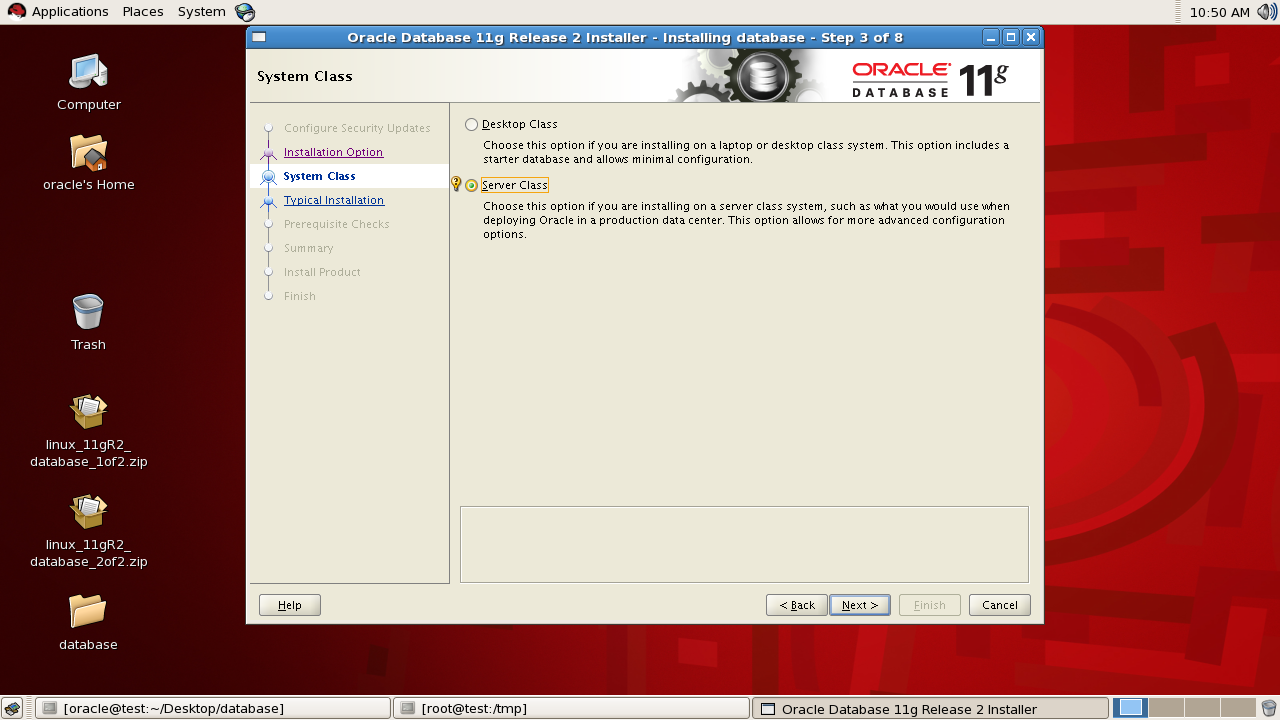
System class

select the "server class" for more advanced configuration option and Click next button


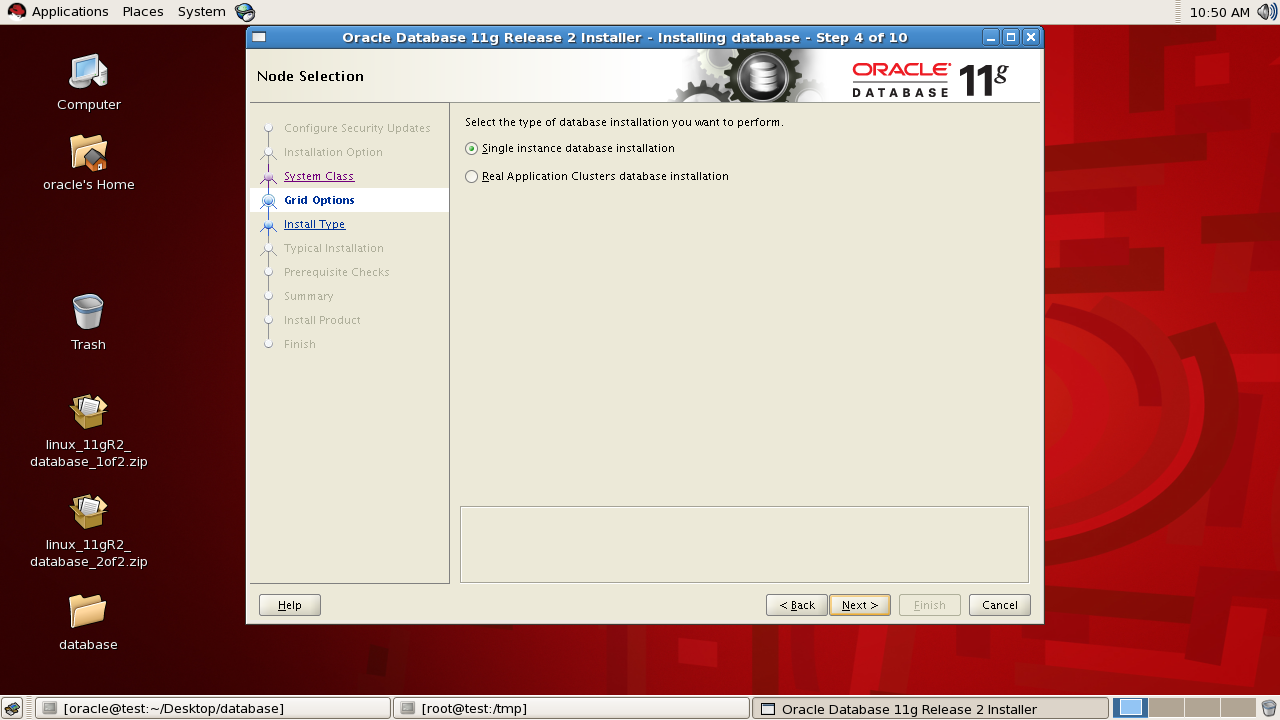
Grid option:

Select "single instance" or "Real application clusters" database installation. Click next button.


Install type:

Select "Typical install" option and click next button.


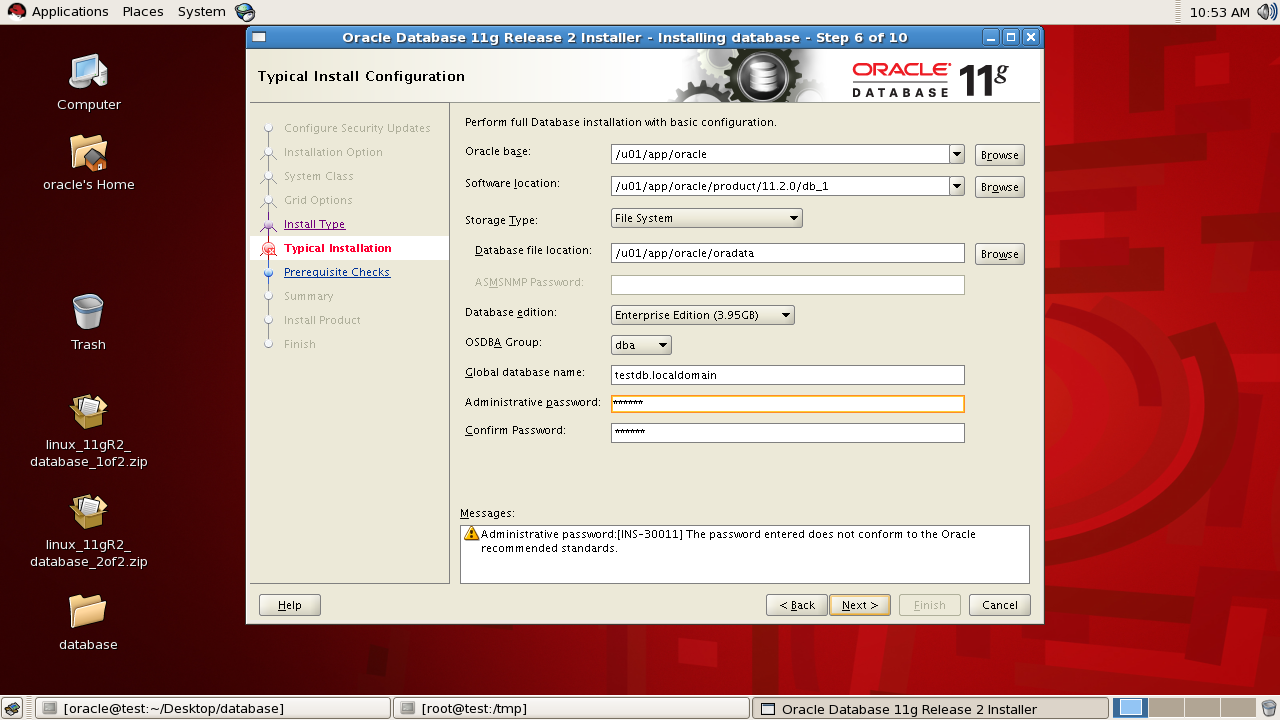
Typical installation:

Provide the global database name and administrative password. Also check other prepopulated entries. After verifying the entries click the next button.


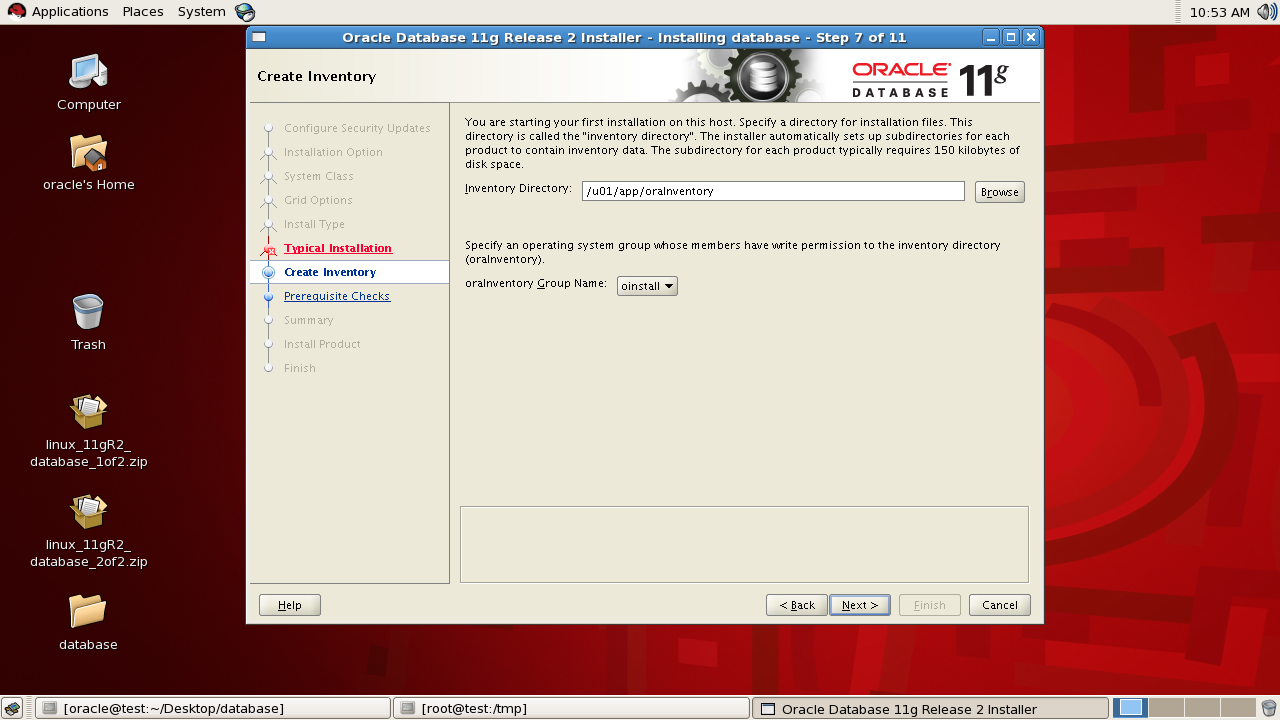
Create inventory:

Verify the prepopulated inventory directory and it's group name and click the next button.


Prerequisite checks:

Proceed only after confirming all the prerequisite checks are succeeded.


Summary:

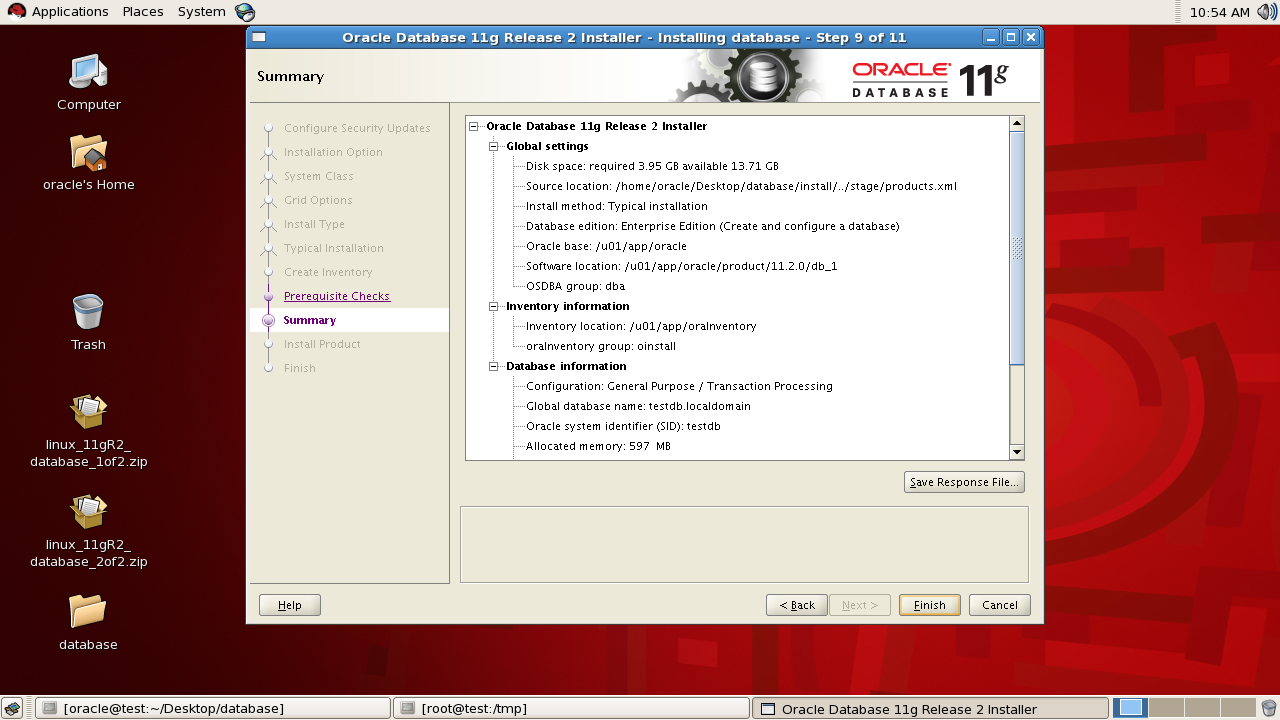
Go through the configuration summary and click the finish button.


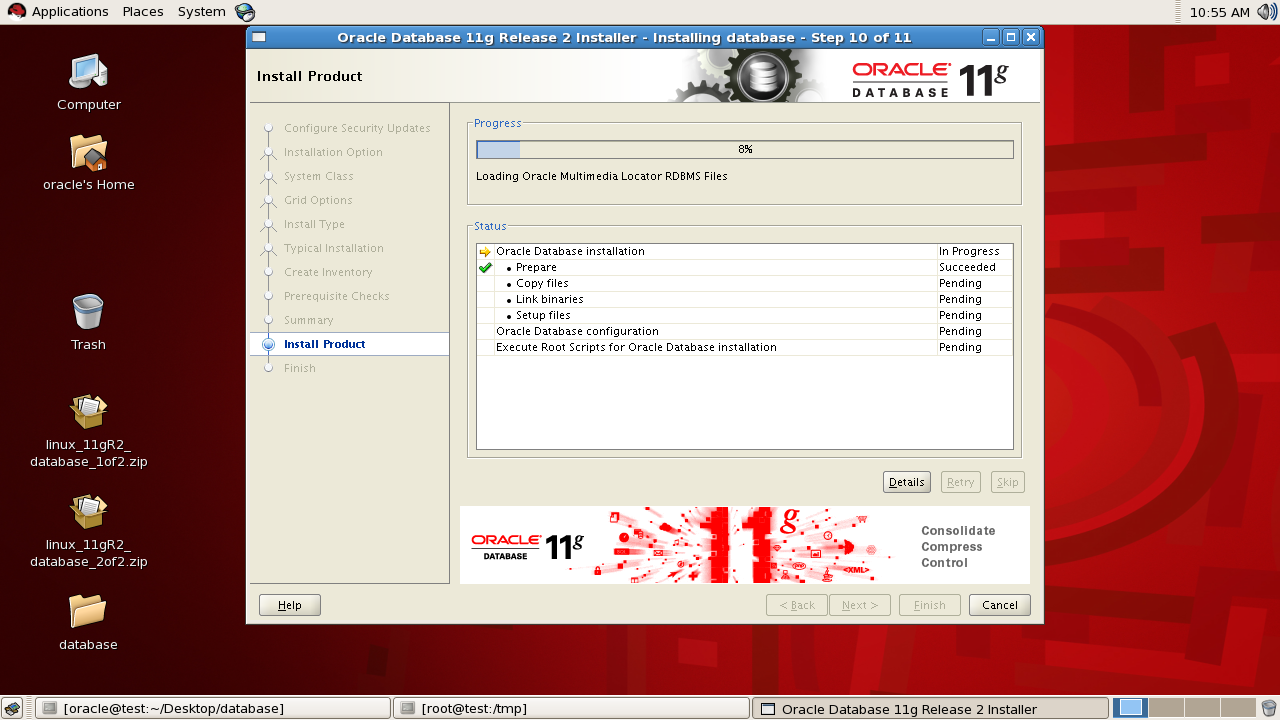
Install product:

Wait for installation of all the products to complete.


Starts Database configuration Assistant:

If we had opted to create a database, then dbca will starts automatically after completing the product installation.


Click ok

Execute configuration scripts:

Execute both the scripts by login as root user and after successful completion click the ok button.


[oracle@test dbs]$ su -
Password: 
[root@test ~]#
[root@test ~]# /u01/app/oraInventory/orainstRoot.sh
Changing permissions of /u01/app/oraInventory.
Adding read,write permissions for group.
Removing read,write,execute permissions for world.

Changing groupname of /u01/app/oraInventory to oinstall.
The execution of the script is complete.
[root@test ~]#
[root@test ~]#
[root@test ~]# /u01/app/oracle/product/11.2.0/db_1/root.sh
Running Oracle 11g root.sh script...

The following environment variables are set as:
    ORACLE_OWNER= oracle
    ORACLE_HOME=  /u01/app/oracle/product/11.2.0/db_1

Enter the full pathname of the local bin directory: [/usr/local/bin]: 
   Copying dbhome to /usr/local/bin ...
   Copying oraenv to /usr/local/bin ...
   Copying coraenv to /usr/local/bin ...


Creating /etc/oratab file...
Entries will be added to the /etc/oratab file as needed by
Database Configuration Assistant when a database is created
Finished running generic part of root.sh script.
Now product-specific root actions will be performed.
Finished product-specific root actions.
[root@test ~]# 

Finish:

Now the oracle software is successfully installed and a database named "testdb" has been created.


Verify the database details:

Login as sys user, start the database created and verify the database details.

18:20:51 SQL> show user
USER is "SYS"
18:20:59 SQL> select banner from v$version;

BANNER
--------------------------------------------------------------------------------
Oracle Database 11g Enterprise Edition Release 11.2.0.1.0 - Production
PL/SQL Release 11.2.0.1.0 - Production
CORE    11.2.0.1.0      Production
TNS for Linux: Version 11.2.0.1.0 - Production
NLSRTL Version 11.2.0.1.0 - Production

Elapsed: 00:00:00.00
18:21:06 SQL> select name from v$database;

NAME
---------
TESTDB

Elapsed: 00:00:00.00
18:21:21 SQL> select instance_name,status from v$instance;

INSTANCE_NAME    STATUS
---------------- ------------
testdb           OPEN

Elapsed: 00:00:00.01
18:21:32 SQL> 
18:21:46 SQL> 


Install Redhat Enterprise Linux 5 operating system for oracle software installation

Install RHEL5 32 bit in vmware workstation:

Here I have downloaded the RHEL5 32 bit operating system software as an iso image and are installing it in a vmware workstation which is installed  on my personal laptop(windows 7).

Before installing the operating system, I have created a virtual machine with 40GB hardisk, 1.5GB ram size.


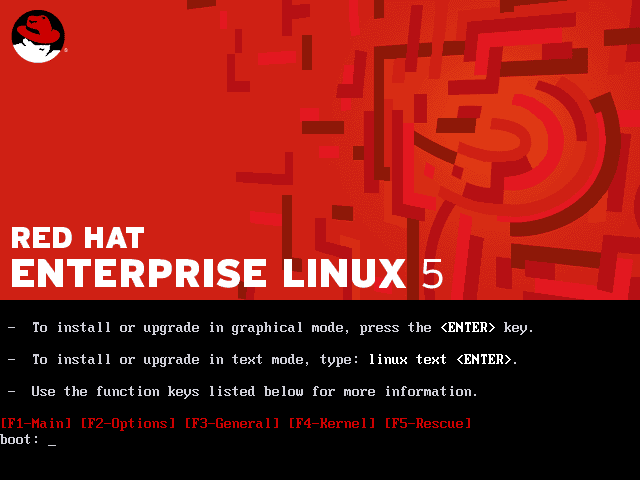
Mount the operating system(iso image) on the virtual machine and press enter to start the installation in graphical mode.


Press tab to move the cursor to the skip button and hit enter.


Select "skip entering installation number"


Click the skip button


click on yes button


Select the "create custom layout option" and click next


Click the new button and partition the disk /dev/sda for the below mounts.


Change the file system type to swap.


Select the "fill to maximum allowable size" option as we are creating only one mount for storing both oracle software and database files.


After completing all the partitioning, the created mount point looks like as given below.


Install the GRUB boot loader.


Provide the ip-address and default subnet mask address for out host server.


Provide a  gateway address..


Move the cursor to asia/kolkatta region and click on it.


Enter the root administrative user password.


Select "customize now" option and click next.


Select the below packages and click next.

  • GNOME Desktop Environment
  • Editors
  • Graphical Internet
  • Text-based Internet
  • Development Libraries
  • Development Tools
  • Server Configuration Tools
  • Administration Tools
  • Base
  • System Tools
  • X Window System


Click next to begin installation.


Now the linux installation is complete.


Perform some post installation tasks.


Disable the firewall settings.


Change the SELinux settings to Disabled.


Click Finish button to complete the installation.


Thanks for reading my blog.
Manu